Batch Posting
Batch Posting
2 views
Jun 10, 2026
Updated Sep 01, 2026
Batch Posting
Screen Location - Main Menu > Banking > Batch Posting
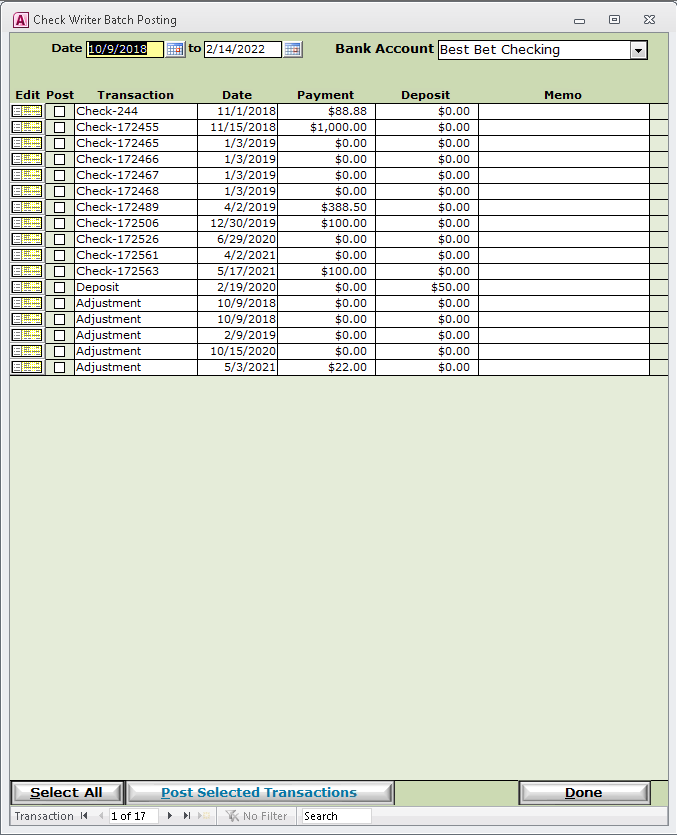
- Double-click the Batch Posting menu item to open up the Batch Posting screen.
- The criteria for what checks are being displayed is being dictated by the To and From date, as well as the Bank Account selector at the top of the screen.
- Open a check directly for editing by clicking the "Edit" button at the far right of each record line.
- Select checks to Post by clicking the checkbox labeled "Post"
- You can select all checks by hitting the "Select All" button at the bottom of this screen.
- Post all selected checks by hitting the "Post Selected Transactions" button next the "Select All" at the bottom of the screen.
- Exit the Check Writer Batch Posting screen by clicking "Done".
Please call or Email us for Information on this topic.