Create Invoices from Tickets
Create Invoices from Tickets
Overview
As a result of defining your rates to your customers in your Job or Order, and entry in Ticket Entry, HaulWare has all of the necessary information to calculate the billing to your customers. Simply select the tickets you wish to bill within a period ending date, and your invoices will be generated. The billing preferences in your Customer's profile will also be used to create and print or email your customer invoices.
Screen Location - Main Menu > Accounts Receivable > Create Invoices
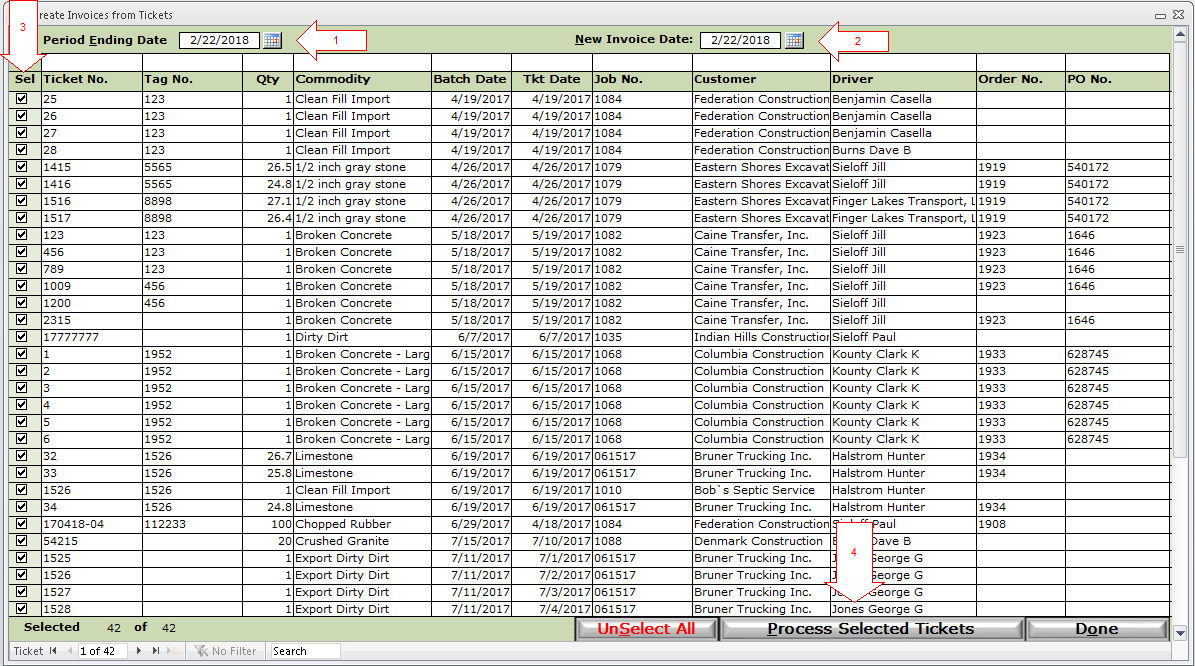
1) Enter your Period Ending Date - This will display all uninvoiced tickets with a ticket date through this period ending date.
2) Enter your New Invoice Date - Invoices created will have this as the Invoice Date. IMPORTANT: The Invoice Date determines what Financial Period your invoice will post in. For example, you have all January tickets on your invoice, and today is February 1st. If you select February 1st as your New Invoice Date, and a new invoice is created for those January tickets with the February invoice date, then all of the revenue from that invoice will appear on the February income statement.
3) Select tickets. You can click the Select All button to quickly select all displayed tickets, or each ticket may be selected individually by checking the boxes in the Sel column.
4) Process Selected Tickets - Click to process the tickets. Processed tickets will be moved on to invoices and removed from this screen.
The next step is to Post and Print/Email the new invoices. This may be done for each Invoice individually or in a batch using Invoice Batch Post.