Fuel Surcharge Setup
Setup
2 views
May 20, 2026
Updated Sep 01, 2026
Fuel Surcharges are defined in "Schedules" that can be assigned to either a customer, or a driver pay type. There is no limit to the number of schedules you can create. FSC rates are defined for ranges of dates and can be changed weekly, monthly, etc..
Screen Location - Main Menu > Files > Fuel Surcharge
Click New or select an existing schedule from the Quick Find drop down.
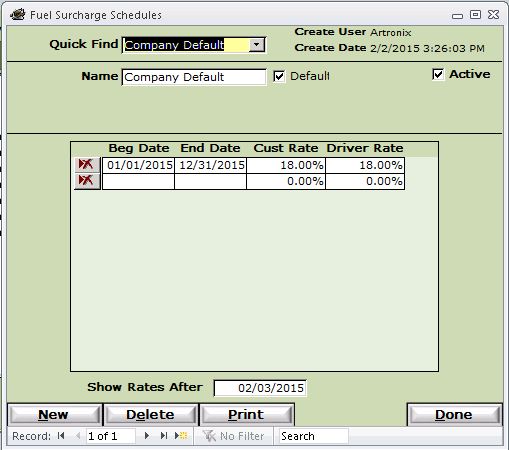
- Name - Any unique name for the schedule
- Default - Check this box to apply this FSC schedule to any customer that does not currently have a schedule assigned.
- Active - Uncheck this to remove this schedule from the available list of schedules for customers and driver pay types.
- Beg Date / End Date - This is the effective date range for this FSC rate. NOTE: Be sure date ranges do not overlap! The system will take the first range it finds for a date.
- Cust Rate - This is the percentage of FSC to be applied to each line on a customer invoice that has the "S" (surchargeable) checkbox checked.
- Note - The total FSC is displayed at the bottom of the invoice.
- Driver Rate - This is the percentage of FSC to be applied to each driver settlement line that meets the setup parameters below for driver FSC.
- Show Rates After - This is just for display purposes to keep very old rates from displaying on the screen. You may change this to display older rates.
Buttons
- New - Create a New Fuel Schedule.
- Delete - Delete the Selected Fuel Schedule.
- Print - Print the Selected or All Fuel Schedule.
- Done - Close this window.
Note - The final step is to associate the schedule to either an existing Customer and/or Driver.