Import Audit
Import Audit
3 views
Mar 18, 2026
Updated Sep 01, 2026
Ticket Import Audit
Overview - Import Audit is a designed to allow tickets to be imported from other sources that include Mobile Dispatch, Ticket Relay, and Ticket Exchange.
Screen Location - Main Menu > Tickets and Time > Import Audit
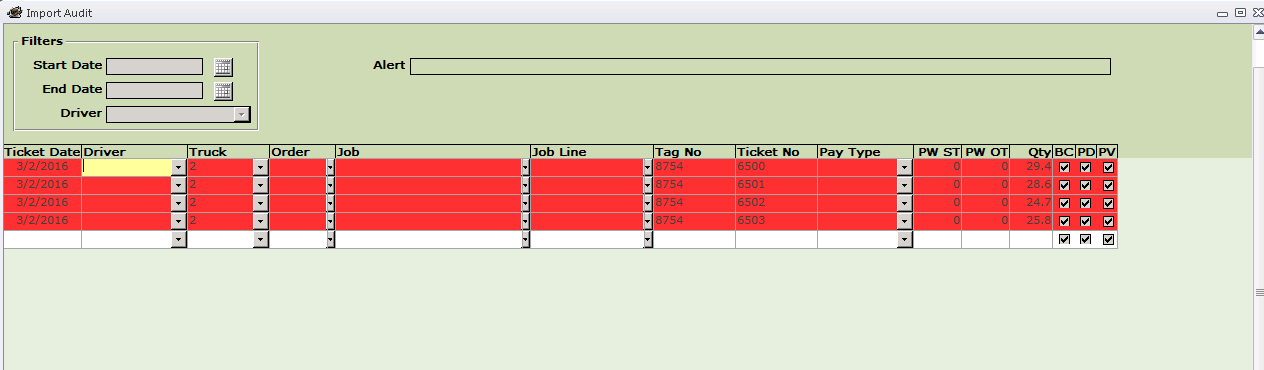
Note: Imported records will be transferred to the Audit screen before becoming ticket records. Ticket date, Truck #, Tag #, Ticket # and Quantity will be populated.
- The auditor then selects the appropriate Driver, Order or Job, Job line and populates the PW hours fields.

- Once the imported records have been completed and validated by the system, the red highlight will be cleared and the records can then be processed into a ticket batch.
- Click the Process Batch button to process the records on the screen to a Ticket Batch. Note: Deleting a Ticket or Ticket Batch returns the records to the Audit Screen.
Note: Fuel surcharge and tax records are not imported from the CSV file.
Note: A Ticket Exchange file cannot be imported more than once. If re-import is required, the audit records must first be deleted from the audit screen using the Right Click function.