Payable Check Run
Payables Check Run
Overview
Use this option to create payment for one or more AP Bills, by check or adjustment (EFT). Printing of the checks actually occurs in the Check Writer option, not with the Print button on this screen.
Screen Location - Main Menu > Accounts Payable > Payable Check Run
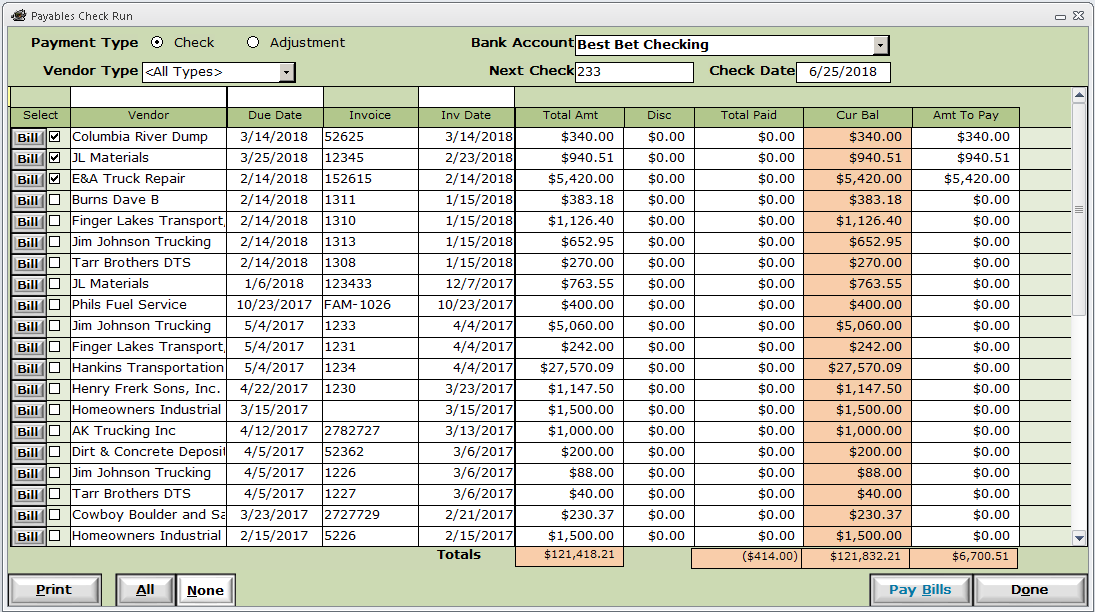
Payment Type - Select Check to print checks, or Adjustment for EFT payments.
Vendor Types - If you wish to pay only material suppliers, or subcontractors, then you can filter the list to only those vendor bills.
Bank Account - Change this if you wish to pay from an account other than your default bank account.
Next Check - This prompt will appear only if the Payment Type is Check. Enter the number of the next laser check to be printed. IMPORTANT: Double-check this for every check run. If it is wrong, you will need to change the check numbers on all of the generated checks.
Adj Type - This prompt will appear only if the Payment Type is Adjustment. Enter the adjustment type code (ex: EFT).
Check Date - This will be the transaction (check or adjustment) date. This date determines which Financial Period your check or EFT adjustment will be posted to.