Sales Tax Rates
Setup
2 views
Jun 17, 2026
Updated Sep 01, 2026
Sales Tax Rates
Screen Location - Main Menu > Setup > Sales Tax Rates
Overview
The Sales Tax Rates module allows you to define and maintain sales tax rates for different jurisdictions (cities, counties, states). It supports multiple tax rates with effective date ranges to handle historical and future rate changes. These rates are used when generating invoices and calculating sales tax.
Sales Tax Rates Screen
This screen is used to create, edit, and manage sales tax rates.
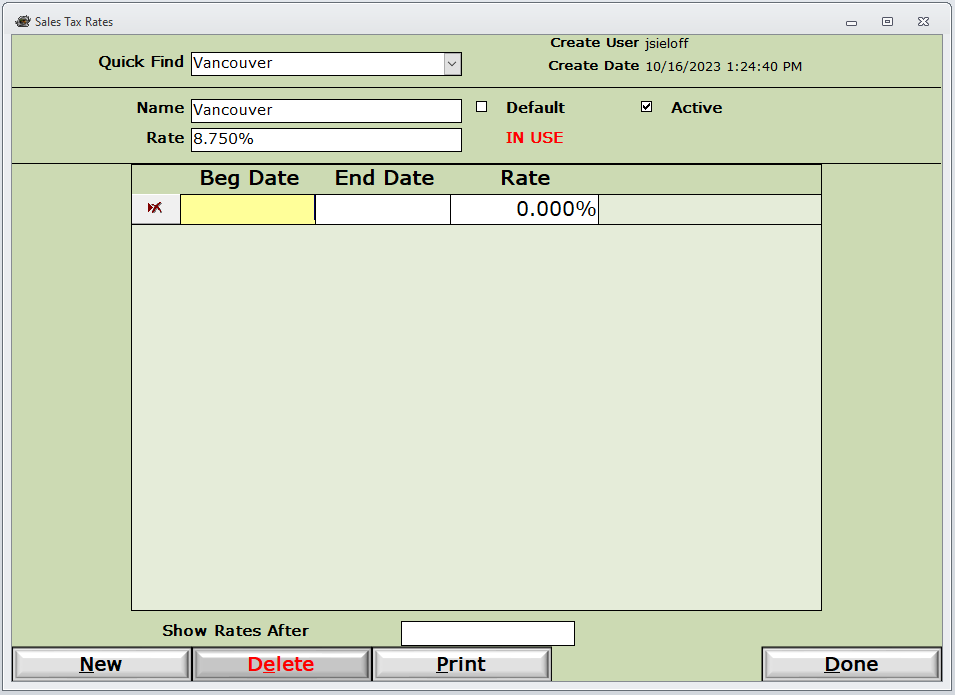
Key Elements:
- Quick Find: Dropdown to quickly locate existing tax jurisdictions.
- Name: Name of the tax jurisdiction (e.g., "Vancouver").
- Rate: Current sales tax rate (e.g., 8.750%).
- Default: Marks this rate as the system default when no specific jurisdiction is selected.
- Active: Enables or disables the tax rate.
- IN USE: Indicator showing the rate is currently applied to transactions.
- Rate History Table:
- Beg Date / End Date: Effective date range for each rate.
- Rate: The tax percentage for that period.
- Show Rates After: Filter to view historical rates after a specific date.
Action Buttons:
- New: Create a new sales tax jurisdiction or rate.
- Delete: Remove a tax rate (use with caution).
- Print: Print the current tax rate configuration.
- Done: Save changes and close the screen.
How to Access
- Navigate to the Setup menu.
- Select Sales Tax Rates.
- Use Quick Find to locate an existing rate or click New to add one.
Common Uses
- Setting up sales tax rates for different cities or counties where you operate.
- Updating tax rates when jurisdictions change their percentages.
- Maintaining a history of tax rates for audit and reporting purposes.
- Marking a primary/default tax rate for general use.
Tips
- When a tax rate changes, add a new row with a Beg Date instead of overwriting the existing rate to preserve history.
- Ensure the Active checkbox is enabled for rates currently in use.
- The system will automatically apply the correct rate based on the transaction date and jurisdiction.
- Print the tax rate list periodically for your records.
Please call or Email us for Information on this topic.