Commodity Items
Commodity Item Management
Main Menu -> Files -> Commodity Items
Use this file to record all of the different types of materials you work with in your jobs. In additional to materials, you may work hourly for a contractor and the type of material you move may not be relevant in your billing. In that case, you may want to create a commodity item Hourly or Hourly Work to show on your billing.
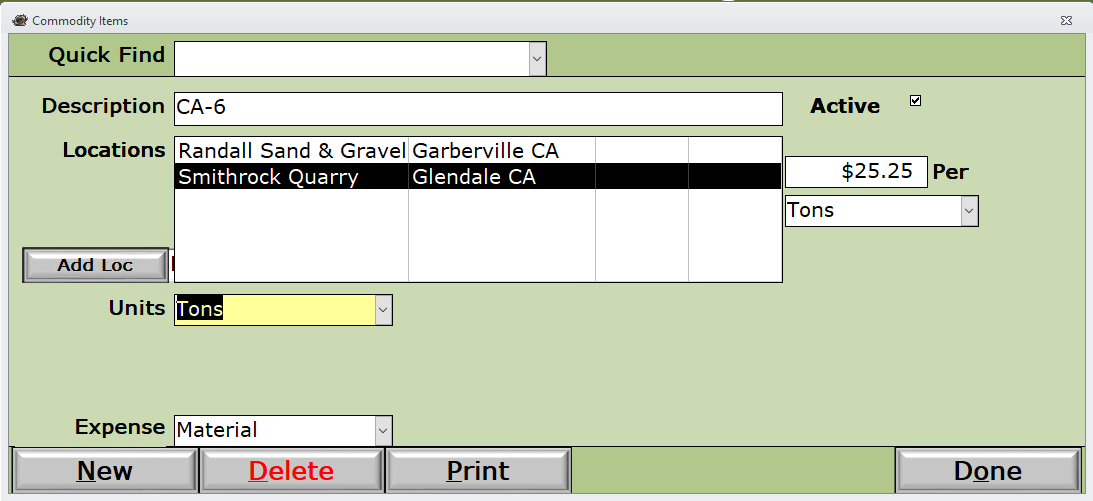
Quick Find - Use the Quick Find dropdown selection to find and select the existing record you are looking for.
Description - Material or service as you would want it to read on your invoicing.
Active - If unchecked, will prevent this item from appearing on dropdown lists.
Locations - Each quarry location that provides this particular commodity along with their price per Unit of Measure.
Add Loc button - Add a new quarry location and price.
Units - Normal unit of measure.
Expense - The type of expense as defined in the Company Setup -> Files - Expense Categories section.